
Planning CCTV installation in Chennai can feel overwhelming — dozens of camera types, a confusing price spread, and a major new compliance rule that took effect on 1 April 2026. This complete guide walks you through everything in plain language: why Chennai properties need surveillance, which cameras suit your property, the new STQC mandate, realistic cost factors, footage storage, maintenance, the legal basics, and exactly how to pick an installer you can trust.
It is the hub of our wider knowledge base. Wherever a topic deserves more depth, we link you to a focused guide so you can go as deep as you need. With 500+ installations and 5000+ cameras deployed across the city, WAEI Enterprise has distilled real field experience into this single reference.
Quick Start: Want to skip ahead? See how our CCTV camera installation service in Chennai works, or book a free site survey and our experts will design a system for your property — no obligation.
Why Chennai Properties Need CCTV in 2026
Chennai is India's fourth-largest metropolis, home to 11+ million people, more than 1.5 lakh registered businesses, and a sprawling IT corridor along OMR. That density brings real security pressures — petty theft, parking disputes, package theft, and commercial shrinkage — alongside Chennai-specific factors most generic guides ignore.
The biggest of those is weather. Chennai's coastal humidity, salt-laden air, and intense monsoon spells punish cheap hardware. Cameras here need genuine IP66/IP67 weatherproof housings, surge protection against frequent voltage swings, and UPS backup for power cuts — not the bare-minimum kit sold in many quick-fit packages.
For homeowners, CCTV deters break-ins (visible cameras cut attempts noticeably), captures clear evidence for police and insurance, and lets you watch over elderly parents, children, or domestic staff from your phone. For businesses, it reduces theft and shrinkage, documents workplace incidents, protects against liability claims, and often earns a 10–15% insurance premium discount. A well-planned system pays for itself faster than most owners expect.
Types of CCTV Cameras Explained
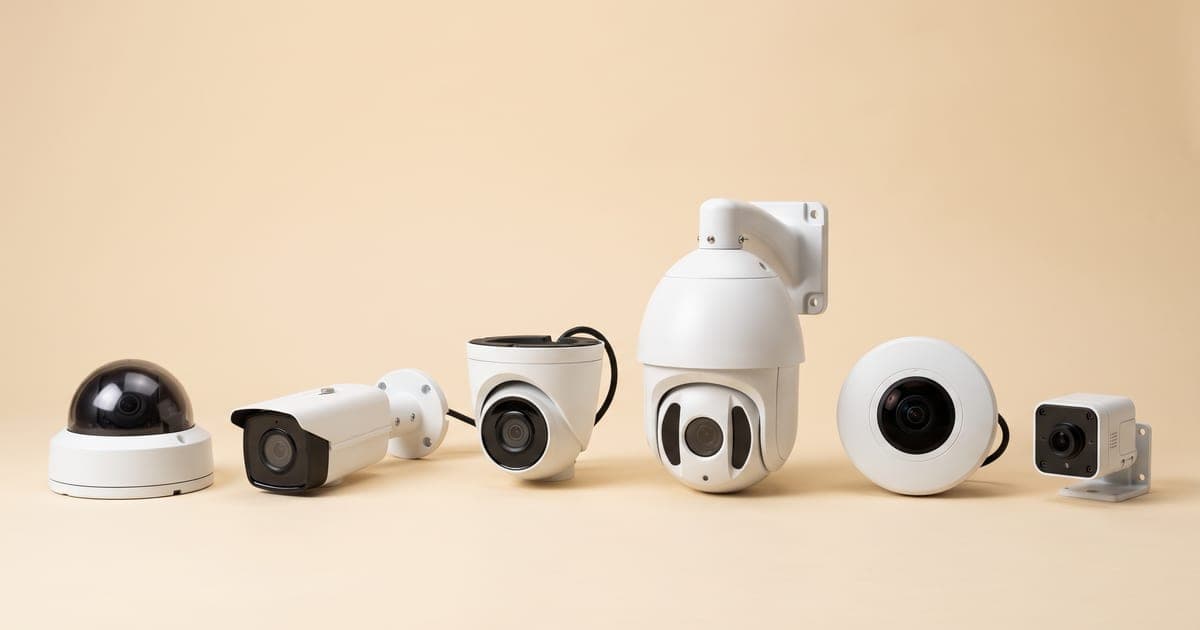
Choosing the right camera body and technology is the foundation of a good system. Here are the formats that matter in 2026 — for every type with pictures, including turret, fisheye and 4G cameras, see types of CCTV cameras explained.
IP Cameras (Network Cameras)
The gold standard for new installations. IP cameras send video over your network — wired (PoE) or WiFi — at 2MP to 12MP, with smart analytics like motion zones, line-crossing alerts, and face or object detection. They scale easily and integrate with access control and alarms. For most Chennai homes and businesses we recommend a wired IP CCTV system as the future-proof choice.
Analog Cameras (HD-TVI/CVI/AHD)
Modern analog cameras deliver 720p–5MP HD over coaxial cable at a lower price point. They are simple, reliable, and ideal for upgrading existing wiring or tight budgets — but smart features and remote access are limited. If you're weighing the two, our IP camera vs analog comparison breaks down exactly when each wins.
WiFi vs Wired
WiFi cameras are quick to install and great for renters or single-room coverage, but they depend on signal strength and are easier to jam. Wired systems are more reliable for whole-property coverage. See our dedicated WiFi vs wired CCTV guide before you decide.
Dome, Bullet, and PTZ
- Dome cameras — discreet, vandal-resistant (IK10 housings), 90–180° coverage. Best indoors, in receptions, and vandal-prone spots.
- Bullet cameras — visible deterrent, long-range, weather-sealed with 30–50m IR night vision. Best for perimeters and outdoor runs.
- PTZ cameras — pan, tilt, and 20x–40x zoom let one unit cover the area of 4–6 fixed cameras with auto-tracking. Best for parking lots, compounds, and warehouse floors.
Specialty Cameras
Thermal cameras detect heat in total darkness for perimeter security; fisheye/panoramic cameras give 180–360° coverage from a single point; and LPR/ANPR cameras read number plates for automated gate logging and parking management.
How to Choose by Property Type
The right system depends far more on your property than on any single "best" camera. Use these starting points, then refine with a site survey.
Homes and Apartments
A 1–2 BHK apartment is typically well covered by 4 cameras (entrance, balcony, parking view, common passage), a 4-channel NVR, and 1TB storage. An independent house needs 6–8 cameras across all entry points, compound, and backyard with 2TB storage and a video door phone. A villa may need 10–16 cameras including a PTZ for the compound, 4TB+ storage, and cloud backup. Living in a gated community? Our CCTV for apartments and housing societies guide covers shared infrastructure and association approvals. Not sure of the right count for your property? See how many CCTV cameras you need.
Shops and Retail
A small store usually needs 4–6 cameras covering entrance, billing counter, storage, and aisles, with optional POS integration to tie transactions to footage and cut counter fraud. Our CCTV for shops and retail stores guide details counter placement and shrinkage reduction.
Offices, Factories, and Warehouses
Medium offices typically run 8–16 cameras with access control and visitor management. Large warehouses and factories scale to 32–100+ cameras on VMS software with RAID storage and a command-center view. See our CCTV for factories and warehouses guide for wide-area and high-bay coverage strategy.
The 2026 STQC Mandate: What You Must Know
This is the single most important change for anyone buying CCTV in Chennai right now, and it's where cheap installers will quietly cut corners.
From 1 April 2026, under the MeitY/STQC Essential Requirements, non-compliant CCTV cameras can no longer be manufactured, imported, or sold in India. STQC (Standardisation Testing and Quality Certification) sets mandatory security and quality standards covering every network-connected device — IP cameras, PoE cameras, NVR-based systems, and cloud-connected setups.
What this means for you in practice:
- New purchases must use STQC-certified hardware. Insist on it. Some popular imported brands are not yet certified, so verify model-by-model before you buy.
- Already-installed systems can keep operating — the rule restricts new sales and installations, not your existing cameras.
- Future-proofing matters. Buying non-compliant stock now risks support and warranty gaps later.
Every WAEI installation uses STQC-compliant equipment. For the full picture, read our STQC certification complete guide, and pair it with our best CCTV camera brands for India 2026 shortlist of certified, field-proven options.
What Drives CCTV Installation Cost in Chennai
Cost depends on camera count, resolution, camera type (fixed vs PTZ vs specialty), cabling distance, storage size, smart features, and integration needs. Beware of suspiciously cheap "all-inclusive" packages — they often skimp on weatherproofing, surge protection, and STQC-compliant hardware, which costs far more to fix later.
Rather than quote misleading flat figures here, we maintain a transparent, regularly updated breakdown: see our CCTV installation cost in Chennai price list for component-level pricing and sample packages. Every WAEI quotation is itemized — you see exactly what each camera, recorder, and accessory costs, with no lump-sum surprises.
The Professional Installation Process
A quality installation is mostly about planning. Here's how a proper job runs.
- Free site survey — we map entry/exit points, high-value zones, blind spots, lighting (day and night), and power/network availability.
- System design and itemized quote — camera mix, placement, storage, and a transparent price list.
- Cabling and mounting — concealed wiring in conduits, weatherproof IP66 junction boxes outdoors, and correct camera heights (2.5–3m for face capture, never too high).
- Configuration — recording schedules, motion zones, surge protection, UPS backup, and grounding.
- Mobile setup and training — we configure phone access and walk you through playback. New to it? Our how to view CCTV on mobile guide is a handy reference.
Common mistakes to avoid: cameras mounted too high to capture faces, backlighting from windows, gaps in night-vision coverage, exposed cables that are easy to cut, and no backup power or storage redundancy.
Footage Storage and Retention
How long your system keeps footage depends on hard-drive size, camera count, resolution, and recording mode (continuous vs motion-triggered). As a rough guide, recording continuously, 1TB holds about 10 days for four 2MP cameras on H.265 (around three weeks with H.265+) but only 3–7 days for eight 4MP cameras. Work out your own figure with our CCTV storage calculator. Higher resolution and more cameras eat storage fast — so size the NVR for the retention period you actually need (insurance and police investigations often require 30+ days), and consider RAID or cloud backup for critical sites. For a full comparison of SD card, DVR/NVR and cloud — including how to avoid monthly fees — see CCTV storage: cloud vs SD vs DVR/NVR.
Maintenance and AMC
CCTV is not "install and forget." Chennai's dust, humidity, and power fluctuations degrade systems that aren't maintained. A practical routine: clean lenses monthly, verify recordings weekly, check storage monthly, and apply firmware security patches quarterly. Watch for warning signs — blurry images, cameras dropping offline, recording gaps, or fading night vision.
An Annual Maintenance Contract (AMC) keeps your system reliable with scheduled preventive visits, priority support, and firmware updates. WAEI includes 1 year of free AMC with every installation, and our AMC service plans cover you beyond that. It's the cheapest insurance against a system that fails the one night you need it.
Legal and Privacy Basics
CCTV is legal in India when used responsibly. You may install cameras on your own property, monitor apartment common areas (with association approval), and record public-facing areas of your business or workplace (with employee notification). You may not record neighbours' private property, place hidden cameras in private spaces like bathrooms or changing rooms, record audio without consent in most cases, or share footage publicly.
Best practice is straightforward: display "CCTV in Operation" signage at entry points, keep a written workplace surveillance policy, secure recordings against unauthorized access, follow a sensible retention period, and handle footage per IT Act data-protection guidelines.
How to Choose a CCTV Installer in Chennai
The hardware matters, but your installer matters more. A great camera badly mounted on cheap cable is a waste. Use this checklist:
- STQC-compliant hardware — non-negotiable in 2026. Ask to see certification.
- Free, detailed site survey — anyone quoting without seeing your property is guessing.
- Itemized, transparent quotation — not a vague lump sum.
- Concealed, professional cabling with weatherproofing and surge protection.
- Genuine warranty and AMC — and a track record of honouring it.
- Local proof — verifiable Chennai installations and references.
This is exactly where WAEI Enterprise stands apart: free site survey, itemized quotes, STQC-compliant equipment, 500+ completed projects, concealed professional wiring, and 1 year of free AMC. We design for Chennai's real conditions, not a generic template.
Frequently Asked Questions
How much does CCTV installation cost in Chennai?
Cost depends on the number of cameras, resolution, storage, camera type, and cabling complexity. A small home setup is far cheaper than a multi-camera commercial system. For a transparent component-level breakdown and sample packages, see our Chennai CCTV cost price list, or book a free site survey for an exact, itemized quote.
What is the 2026 STQC rule and does it affect me?
From 1 April 2026, only STQC-certified CCTV hardware can be newly sold and installed in India. If you are buying a new system, insist on certified equipment. Systems installed before the deadline can continue operating, but any new cameras you add must comply.
Should I choose IP or analog cameras?
For most new installations we recommend IP cameras — they offer higher resolution, smart analytics, easy remote access, and better scalability. Modern HD analog cameras remain a solid budget choice or upgrade path where existing coaxial cabling is in place.
How long does footage stay stored?
It depends on hard-drive size, camera count, and resolution. As a guide, 1TB holds about 15–20 days for four 2MP cameras but only a few days for eight 4MP cameras. We size your NVR to the retention period you need, typically 30+ days for insurance and investigations.
Do cameras keep working during power cuts?
With UPS backup, cameras and the recorder continue running for roughly 2–4 hours during an outage. For areas with frequent or long power cuts, we also offer solar-powered and extended-backup options.
How do I choose a trustworthy CCTV installer?
Look for STQC-compliant hardware, a free detailed site survey, an itemized quotation, concealed professional cabling, and a genuine warranty plus AMC. Verifiable local Chennai installations and references are the strongest signal of a reliable installer.
Get Started Today
Ready to secure your Chennai property the right way — with STQC-compliant hardware, professional installation, and 1 year of free AMC?
- Book a free site survey: Schedule a visit and we'll assess your property and provide a detailed, itemized proposal.
- Call us: +91-9894518648 (Monday–Saturday, 9 AM – 7 PM).
Last updated: June 2026. Specifications and regulations subject to change — contact us for current information.
Tags
- CCTV Installation Chennai
- Security Cameras Guide
- Home Security Chennai
- Business CCTV
- IP Camera Installation